A print-ready garment artwork package needs more than a logo file. A clothing brand should provide usable artwork, the final print dimensions, a measurable garment position, intended colors, garment and fabric information, the selected print direction and a clear approval reference. These inputs let the factory check feasibility, prepare a meaningful sample and repeat the approved result in bulk.
At KAOUYOU, the sales team checks the client's artwork first and then sends the confirmed information to the specialist print partner. An incomplete file does not prevent an early cost estimate, but sampling cannot proceed until the production-critical artwork details are confirmed.
Answer in 30 seconds
- Send vector AI or PDF files for clean logos and text; use high-resolution PSD or PNG files for photographs and complex raster effects.
- Prepare raster artwork at its actual print dimensions, ideally around 300 DPI, rather than enlarging a small web image.
- State print width, height, center line and a measurable position from the garment—not only “center chest.”
- Use true transparency for areas where the garment should show through, and clearly identify any white elements that must print.
- Approve the final file version, physical size, placement, color and print sample before bulk production.
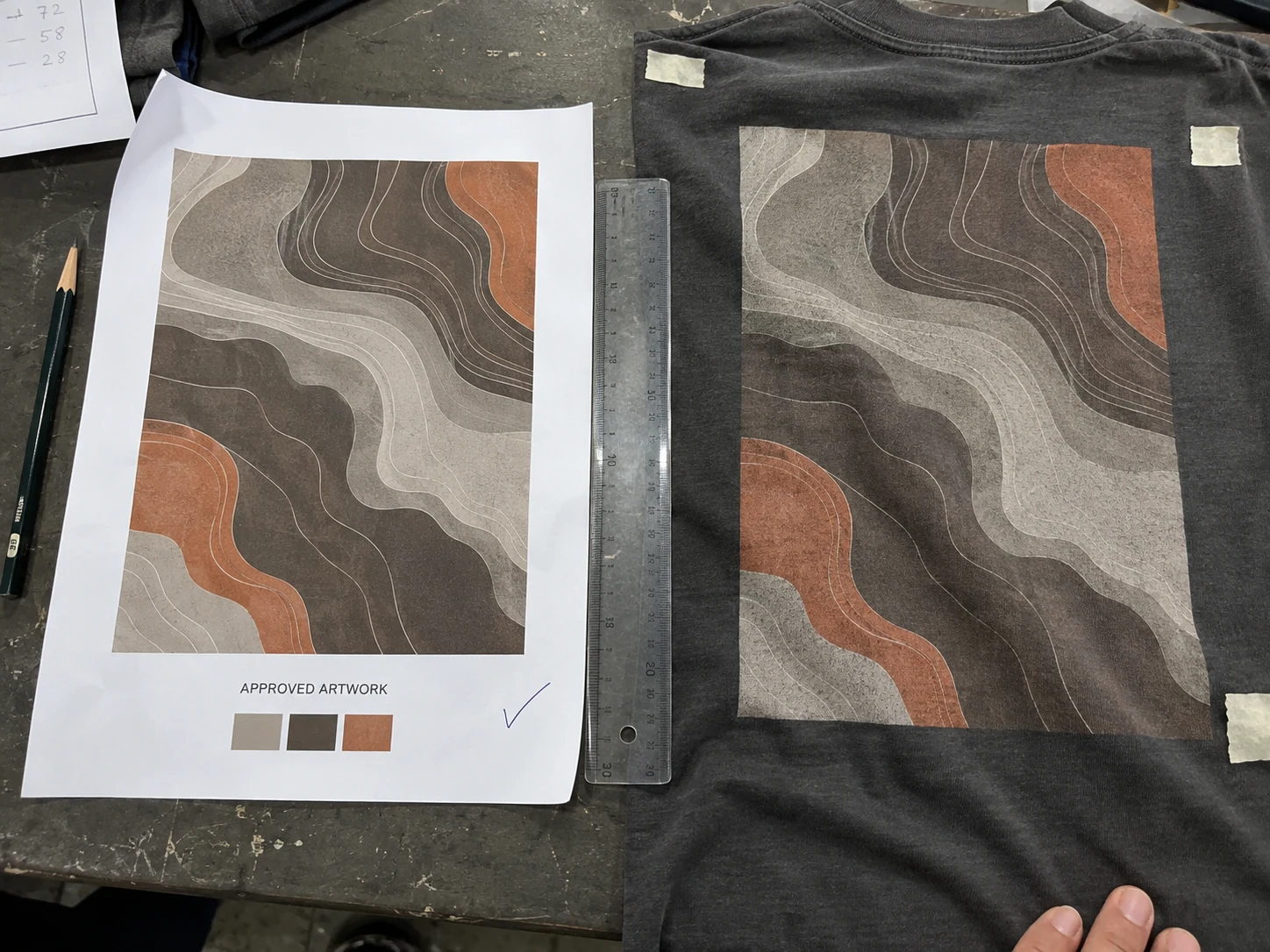
What Should a Print-Ready Garment Artwork Package Include?
The production file and the visual mock-up serve different purposes. The production file supplies reproducible artwork. The mock-up shows the intended relationship between that artwork and the garment. The specification connects both to measurable manufacturing instructions.
A client can send a complete technical package or begin with a reference image, sketch or garment idea. KAOUYOU can help clean and redraw workable artwork without a separate artwork-cleanup charge. The project may still include its normal one-time sampling or development fee, and every reconstructed design must be sent back to the client for approval.
Which File Formats and Resolution Work for Garment Printing?
| File or reference | Useful for | Preparation check |
|---|---|---|
| Adobe Illustrator (.ai) or vector PDF | Logos, type, spot-color graphics and scalable linework | Outline fonts, retain editable paths and identify intended colors |
| PSD | Layered raster artwork, photographs, textures and effects | Supply at the final print dimensions with useful layers retained |
| PNG | Finished raster artwork requiring a transparent background | Use sufficient resolution at final size and remove unintended background pixels |
| Reference mock-up | Showing visual scale, garment location and intended appearance | Use as a visual reference, not as the only production file |
KAOUYOU commonly accepts Adobe Illustrator (.ai), PDF, PSD and PNG files. File extensions do not guarantee production quality: a photograph saved inside a PDF is still raster artwork, and a low-resolution logo does not become scalable merely because it was placed in an Illustrator document.
Vector vs raster artwork
Vector artwork is normally the cleaner starting point for logos, lettering, line art and screen-print spot colors because paths can scale without creating pixelated edges. Raster artwork is appropriate for photographs, painted textures, soft gradients and deliberately pixel-based effects. Raster files should ideally be prepared around 300 DPI at the final print dimensions. A 300 DPI image designed at a small badge size does not remain 300 DPI when enlarged to a full back print.
Outline fonts before handoff so text does not change when the receiving computer lacks the typeface. Keep a separate editable master with live text for future brand revisions.
How Should Artwork Be Prepared for Screen Printing?
Screen-print artwork should make the intended colors, edges and visual effect understandable. Professional clients sometimes supply detailed layers, color separations or print instructions. This is not mandatory for every KAOUYOU project: when suitable original artwork is provided, the specialist print partner normally decides the production separation, white underbase, screen sequence, halftone treatment and related prepress details.
The client still controls the visual result. Identify brand-critical colors, the intended opacity, whether distressed areas are deliberate, and whether the surface should feel thin, heavy, raised or cracked. If a gradient or complex image must be converted into halftones or fewer printable colors, the revised result should be approved rather than assumed from the original screen image.
KAOUYOU does not publish one fixed minimum line width or text size for every screen print. Fine detail depends on the artwork, mesh, ink, fabric surface, color, underbase and intended effect. A borderline detail should be tested on the production-intent material.
If the print method is still undecided, compare the artwork, quantity, fabric and target hand through our screen printing vs DTF guide. A worn graphic such as the oversized cracked-print T-shirt can be used as a visual direction when discussing distressed coverage, but the final technique must be specified and sampled for the project.
How Should White and Transparent Areas Be Prepared for DTF?
For direct-to-film (DTF) artwork, a transparent area means that no design element should print there and the garment should remain visible. An intentional white shape is different: it must remain an explicit part of the artwork. A visual reference should accompany the production file so KAOUYOU and the print partner can distinguish white artwork from empty background.
The client does not normally need to build a dedicated technical white-ink channel unless the print supplier requests it. The print partner's raster image processor (RIP) creates and adjusts the white base used beneath the color image. Roland DG's current DTF workflow similarly describes transparent PNG handling, automatic white-layer generation and RIP white-layer processing. See the Roland DG DTF workflow.
KAOUYOU still checks the transparent edges, intended white elements, garment color and physical result before approval. On dark fabric, stray background pixels and faint halos can become much more visible after a white base is generated. Large transparent-to-solid gradients and very fine semi-transparent effects should be tested rather than judged only on a white monitor background.
A high-detail product such as a photographic graphic T-shirt is a useful reference for discussing raster detail and tonal transitions. The linked product image illustrates the visual direction; it does not replace a project-specific file and print-method approval.
How Do You Specify Print Size and Placement?
State the final artwork width and height in millimetres or centimetres. Add a center line and at least one repeatable garment reference, such as the distance below the high point shoulder (HPS), neckline, shoulder seam or another construction point. Identify whether the measurement applies to artwork edges, its visual center or a bounding box.
If a client sends only a mock-up, KAOUYOU can recommend a print size and position. That recommendation is sent to the client for approval before sampling. This prevents a visually appealing rendering from becoming an unrecorded factory assumption.
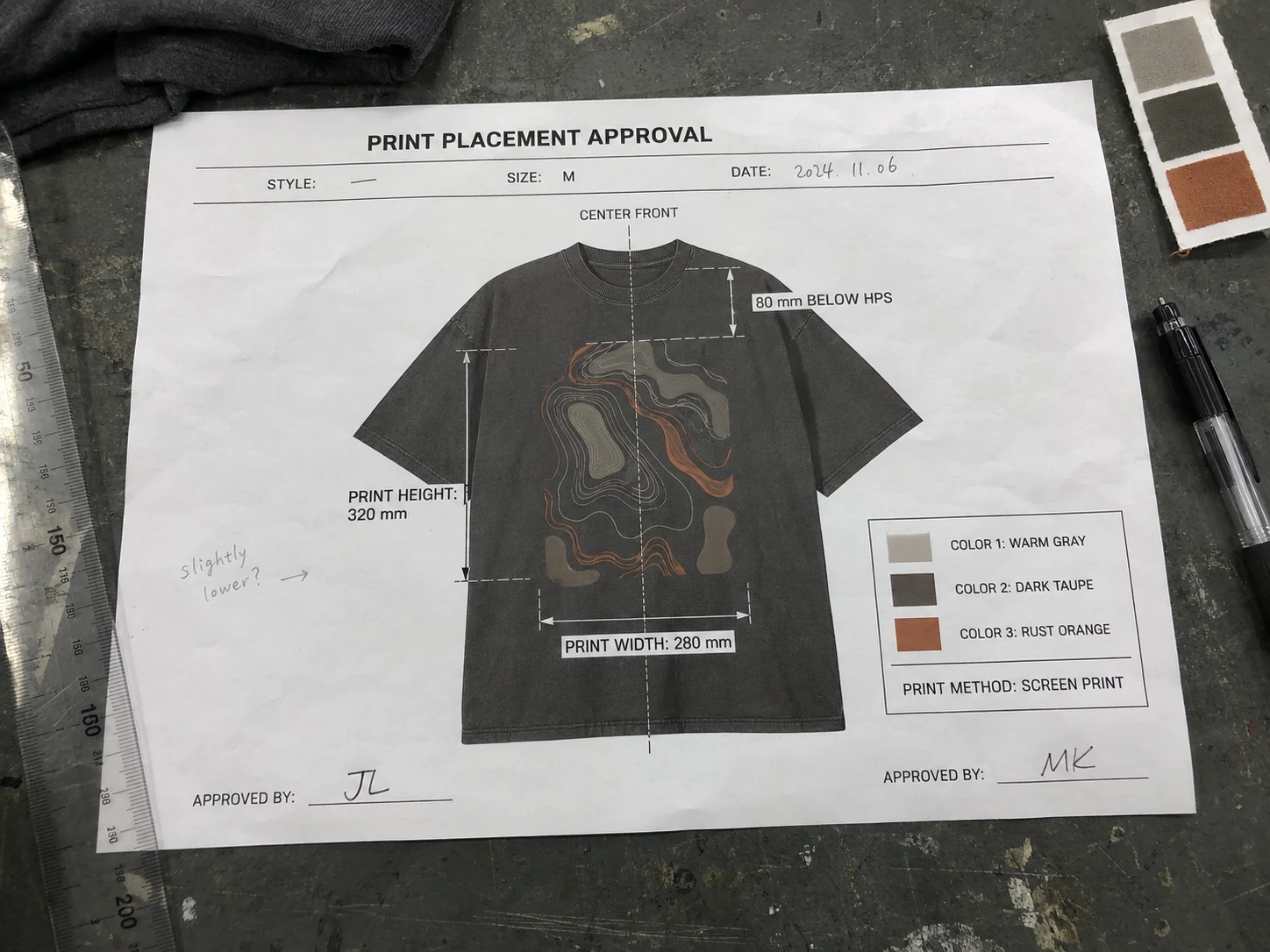
Should artwork scale across garment sizes?
One artwork size can be used across the entire garment size range, but it will appear proportionally larger on a small garment and smaller on a large garment. Another option is to create size groups. KAOUYOU commonly considers grouping approximately three adjacent garment sizes, but this is a working approach—not a fixed rule. The client can request different groupings, and every group should identify its artwork dimensions and applicable garment sizes.
Placement artwork can also interact with panel boundaries. The washed placement graphic T-shirt illustrates why a large, asymmetrical print direction needs explicit boundaries and garment references instead of a generic “large front print” note.
How Should a Clothing Brand Approve Print Color?
A monitor is useful for communication but should not be the only final color standard. Display calibration, file interpretation, garment color, fabric texture, underbase and ink system can all change the physical appearance. If the brand has a critical color, provide the relevant Pantone reference or another agreed color standard.
At KAOUYOU, the client-approved physical result is the final decision point. The electronic file and color callout guide preparation; the approved print sample or garment sample confirms how the color, opacity, texture and surrounding fabric work together. When there is no Pantone reference, KAOUYOU and the client agree on another reference and continue through physical approval.
Garment washing or dyeing adds another dependency. KAOUYOU commonly completes garment dyeing or washing before printing. If the design should fade, crack or merge with the wash, the alternative sequence must be tested and approved because the process can change both artwork appearance and garment dimensions.
What Happens After KAOUYOU Receives the Artwork?
- KAOUYOU's sales team checks the incoming artwork, garment information and visible requirements.
- Questions about format, clarity, dimensions, color, placement, fonts or transparency are listed and confirmed with the client by chat or email.
- The confirmed artwork is sent to the specialist print partner for production review, separation or DTF preparation as applicable.
- KAOUYOU prepares or coordinates the placement layout and physical print sample required for approval.
- The client approves the final artwork version, dimensions, position, colors and print direction before sampling or bulk production continues.
Artwork problems do not necessarily prevent KAOUYOU from estimating a project. The factory can evaluate the likely garment, print area, color count and technique direction. A production quotation and sample, however, depend on the final artwork and specifications because changing the image size, colors, coverage or method can change both cost and feasibility.
Keep feedback consolidated. When KAOUYOU reconstructs a file, recommends a new print size or receives revised client artwork, the new version is returned for approval. This protects both parties from producing against an obsolete attachment or an unrecorded chat image.
What Artwork Problems Delay Garment Sampling?
| File problem | Production risk | Better handoff |
|---|---|---|
| A small web image is enlarged | Edges become soft or pixelated at the intended chest or back-print size | Send the original vector file or the highest-resolution source at final size |
| A white box is part of the image | DTF may reproduce the box instead of showing the garment through | Use true transparency and separately identify any white element that must print |
| Fonts remain live | Text can change when the receiving system does not have the font | Outline the text and keep an editable master file separately |
| No physical dimensions are given | A mock-up can be interpreted at several different scales | State finished width and height in millimetres or centimetres |
| Placement is described only as “center chest” | Vertical position and visual balance remain unclear | Add a center line and a measurable reference from HPS, neckline, shoulder or seam |
| Screen colors are used as the only color standard | Displays and physical ink on fabric can look different | Identify a color reference and approve a physical print sample |
| The design ignores seams or hardware | A screen or heat press may not contact the area evenly | Review the garment construction and move, divide or resequence the artwork when needed |
Why AI-generated clothing artwork needs a feasibility check
An AI-generated visual may communicate a strong concept without representing a producible print. It can contain impossible micro-detail, inconsistent lettering, undefined transparency, blended surfaces or an effect that does not correspond to the requested print method. KAOUYOU therefore reviews the desired physical result and may simplify, redraw or recommend a different technique. The corrected production artwork is always returned to the client for approval.
More broadly, garment artwork should be developed alongside the product rather than after it. Our product-development service connects artwork decisions with pattern, fabric, sample and production feasibility, while the clothing tech pack checklist shows where the approved decoration information belongs in the wider specification package.
Garment Printing Artwork Approval Checklist
Before authorizing a sample or bulk print, confirm the following in writing:
- Final file name and version
- Garment style, garment color and applicable size or size group
- Screen printing, DTF or another confirmed decoration method
- Finished artwork width and height
- Center line and measurable placement references
- Approved colors or physical color reference
- White artwork, transparent areas and any intended garment show-through
- Expected texture, distressing, opacity and hand feel
- Approved electronic layout, print sample or garment sample
- Any remaining item that must be confirmed before bulk production
An approved mock-up confirms visual direction. An approved placement layout confirms measurements and position. A physical print sample confirms color, texture, opacity and print behavior on the intended material. Record which level has actually been approved.
Frequently Asked Questions
What is the best file format for T-shirt printing?
Vector Adobe Illustrator (.ai) or PDF artwork is preferred for logos, lettering and clean graphics because it can be scaled without losing edge quality. PSD and PNG files can also work for photographic or textured artwork when they have sufficient resolution at the final print size.
Is 300 DPI enough for garment printing?
A raster file at about 300 DPI at its actual intended print dimensions is a useful preparation target. The DPI value alone is not enough: a small 300 DPI image can still become visibly soft when enlarged for a full front or back print.
Does a customer need to separate every screen-print color?
Not necessarily. Professional clients may provide detailed separations or production instructions, but KAOUYOU's print partner can normally prepare separations from suitable original artwork. The client still approves the resulting colors and physical print.
How should white artwork be prepared for DTF?
Areas that should show the garment must be genuinely transparent. White objects that should print must remain explicit design elements. Send a visual reference so the print partner can distinguish intentional white artwork from empty background.
Can KAOUYOU fix a low-resolution logo?
KAOUYOU can help clean or redraw workable artwork and normally does not charge a separate artwork-cleanup fee. The project may still carry the normal one-time sampling or development charge, and the client must approve any reconstructed file before use.
Can the factory choose a print size from a mock-up?
KAOUYOU can recommend dimensions when the client has not supplied them, but the recommendation must be approved. A mock-up by itself is not a reliable production measurement.
Should one print size be used across XS to XXL?
It can be, but the visual proportion will change. The brand may approve one size for all garments or use several size groups. The decision depends on the garment, artwork and client requirement rather than a universal grading rule.
Does approving a digital layout approve the final print color?
No. A layout confirms information such as scale and position, while the client-approved physical result controls the final production decision when color, opacity, texture and hand feel matter.